
Your Photos library, backed up to a drive you own.
PhotoVault sits in the menu bar and keeps a copy of your Apple Photos library on your NAS or a USB drive. Albums and metadata come along, and nothing ever gets deleted.
- By Date/2026/10/
- 20261021_183012_A1F3.heicORIGINAL
- 20261021_183012_A1F3.movLIVE PHOTO
- 20261021_183012_A1F3_edit.heicEDIT
- 20261024_071540_B7C2.rafRAW
- 20261024_071540_B7C2.xmpSIDECAR
- 20261103_192245_C904.heicNEW
- By Album/Travel/Japan 2026/LINKS · 0 MB
- _deleted/2026-11-02/KEPT
- .photovault/index.jsonINDEX
How a backup runs
Photos tells PhotoVault what has changed since the last run, so after the first full copy each run only touches new, edited or removed items. Every file is written, checksummed and only then given its real name. Once a week PhotoVault comes back and checks its own work.
Only what changed.
Each job keeps a PhotoKit change token. PhotoVault picks up from it, so a run handles only the items that are new, edited or gone.
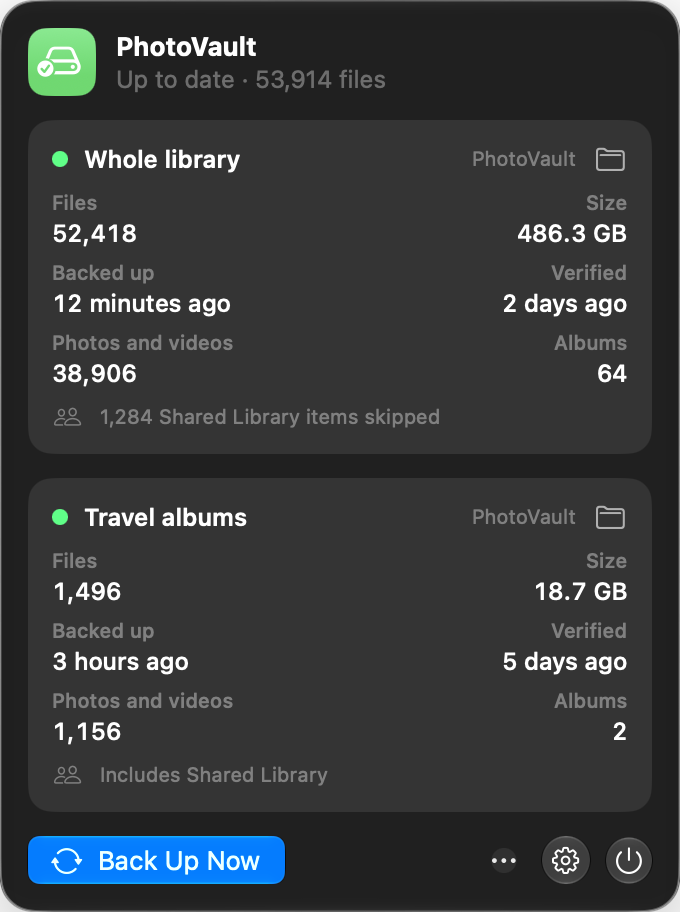
The menu bar window: files, size, and when each job was last backed up and verified.
Originals and edits
If Photos has no stored render of an edit, PhotoVault asks Photos to make one.
Live Photos and RAW
Live Photo videos and RAW+JPEG pairs come across with their stills.
Never lost track
If a change token goes missing or expires, it does one full scan and carries on.
The details live in the file
Albums, your favourite rating, the adjusted date and the location are written into each file. Open the backup in Finder or any other photo app years from now and it still knows when and where every shot was taken.
By Date/ holds the files. By Album/ mirrors your Photos folders and albums as links, so an album costs no extra space.
| FORMAT | WHERE THE METADATA GOES |
|---|---|
| HEIC, JPEG | Inside the file, as EXIF and XMP. Lossless. |
| PNG, TIFF | Inside the file, as EXIF and XMP. Lossless. |
| RAW | A .xmp sidecar next to the file |
| Video | A .xmp sidecar next to the file |
As many backups as you like.
A job is one source and one destination, with its own index, schedule and counts. Send the whole library to the NAS and a couple of albums to a USB stick, side by side.
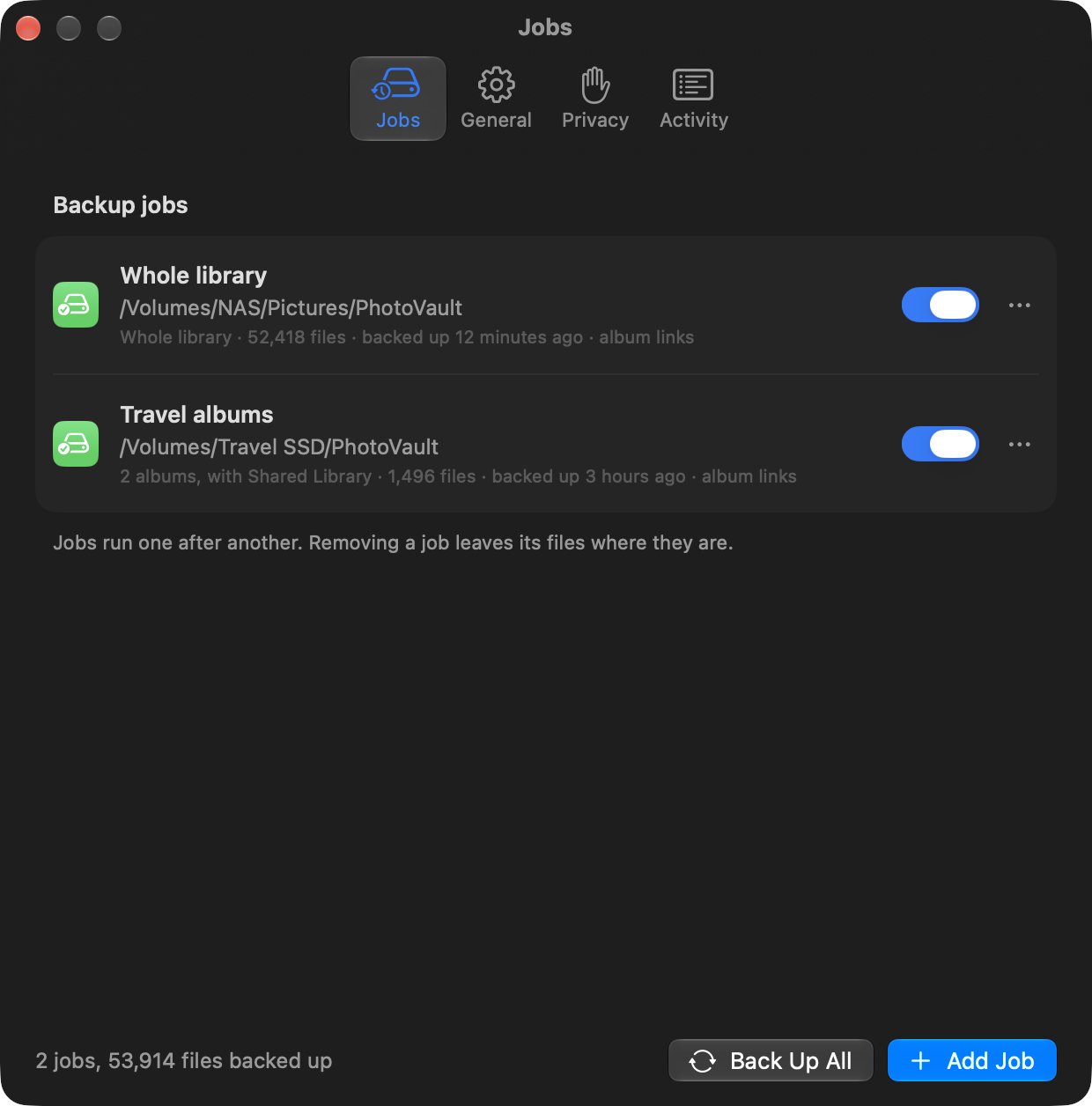
Whole library or albums
Back up everything, or just the albums you pick.
Photos, videos or both
With an optional start date for each job.
Shared Library
On or off, per job.
Built so nothing goes missing
PhotoVault never deletes. When something leaves your library, or falls out of a job’s scope, its copy moves into _deleted/, filed by date. You decide when to empty it.
It also never writes to your Photos library. You only hear from it when a run fails, a check finds a problem, or a drive has been away for a day.
- Pre-flightA destination that isn’t mounted stops the run, so nothing lands on your Mac’s own disk.
- Write as
.partialEach file is written under a temporary name first. - Checksum, then renameOnly a file that hashes correctly gets its real name.
- Save progressStop, Quit, logout and shutdown all save progress before they finish.
- Verify weeklyChecks every file is still there and re-hashes a 2% sample, at least 50. Anything missing or changed is copied again.
What it needs
macOS 14 or later, on a Mac with Apple silicon. The setup window walks you through these permissions and your first job.
| Permission | Why | Needed? |
|---|---|---|
| Photos | To read your library | Yes |
| Full Disk Access | To tell Shared Library items apart. It reads the Photos database, read only. | Only if a job leaves Shared Library off |
| Notifications | Problem alerts | Optional |
| Login Items | Start at login | Optional |
Pick a plain share or drive. Point PhotoVault at something like /Volumes/NAS/Pictures. Folders managed by a sync client (iCloud Drive, Nextcloud, Dropbox, OneDrive, Google Drive) move and delete files on their own schedule and drop symlinks. The job editor warns you if a destination sits inside one.
Questions
Does PhotoVault change my Photos library?
No. It only reads from Photos and never writes to the library.
What happens when I delete a photo?
On the next run its copy moves to _deleted/ on the destination, in a folder for that day. Nothing is erased until you empty it yourself.
How often does it back up?
When Photos changes, after two minutes of quiet. It also runs every 6 hours and shortly after launch, and starts at login. You can hit Back Up Now from the menu bar at any time.
What if the drive isn’t plugged in?
Pre-flight sees the destination isn’t mounted and skips the run, so nothing is written to your Mac by mistake. If a destination stays away for 24 hours you get a notification.
Is a copy of the backup folder still a full backup?
Yes. Each destination carries its own index in .photovault/index.json, so any copy of the folder is complete. Album links are relative symlinks where the drive supports them and Finder aliases where it doesn’t.
How do updates work?
PhotoVault updates itself through Sparkle. You can also choose Check for Updates from the menu bar window.
Where are the logs?
In ~/Library/Logs/PhotoVault/PhotoVault.log, which rotates at 5 MB. They also show up in Console.app, and Reveal Log in the menu bar window takes you straight there.
Found a bug?
Tell me what happened and I’ll look into it. Your PhotoVault version and system version help a lot. You’ll find the app version in its About or Settings window.
Made by Vinny
I’m a controls and safety engineer in Sydney. Outside work I build small, native apps for Mac and iPhone in SwiftUI, and put them up here.
PhotoVault is made by one person, so there’s no support team. If it’s earned a place on your Mac, a tip keeps it going.
Get PhotoVault
Open the DMG, drag PhotoVault to Applications and launch it. Setup takes you from permissions to your first backup.